


FITCAMX
3.298.00 Reviews
App Specs
- Version
- v1.0.60.260702
- Updated On
- License
- Free
- Downloads
- 100,000+
- Developer
- Viidure-pub
- Categories
- Auto & Vehicles
- Platform
- Android
Screenshots
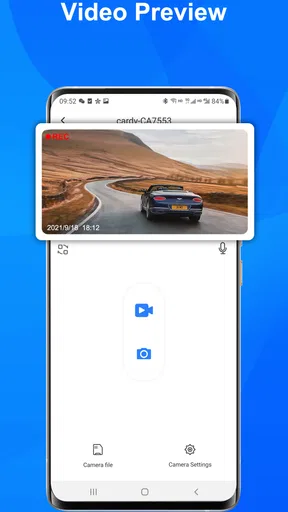
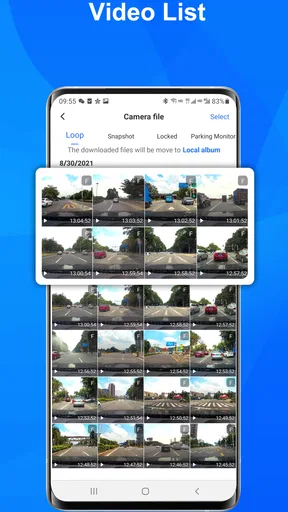
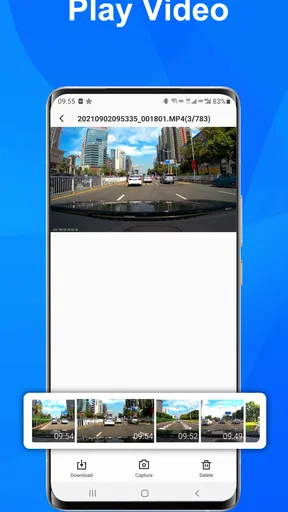
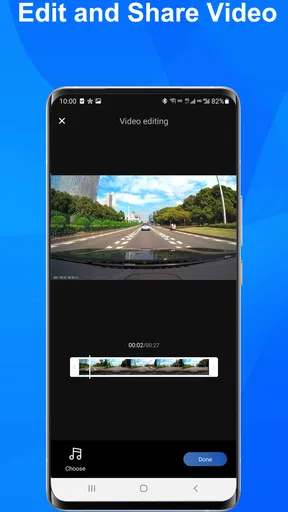
 Analysis by AppCompare
FITCAMX is a companion app for a specific kind of in-car setup: it is made to work with FITCAMX dash cams, rather than serve as a general driving log or a standalone camera app. That distinction matters. If you already use a compatible camera, an app can make reviewing footage more convenient; if you do not, this is unlikely to be useful on its own. I would think of it as part of the dash-cam experience, not as a reason by itself to choose one.
Using FITCAMX with a dash cam
I’d use this section to set expectations for what a dash-cam companion can realistically do: help me reach footage when I’m parked, rather than replace the camera or act as a general driving tool. The distinction is useful before looking at speed, because a focused, deliberate clip check is a different task from instant access during a drive.
What to expect from the app
The developer, Viidure-pub, describes this Android app as a companion customized for FITCAMX cameras. That narrow purpose is both its clearest advantage and its main limitation. Instead of trying to be a broad navigation, insurance, or vehicle-maintenance tool, it focuses on the relationship between a phone and the matching dash cam. I would only install it after checking that my camera is from the FITCAMX range and that its instructions point to this app.
It is free to download, has an Everyone content rating, and has passed 100K+ installs. Its average rating is 3.2 from 388 ratings, with 94 written reviews, so I would approach it with practical expectations rather than assume every setup will be effortless. The current version is v1.0.54.260319, and it supports Android 6.0 and later. Those details make it accessible to many Android users, though compatibility with the operating system alone does not guarantee that a particular phone and camera will work smoothly together.
Speed expectations and everyday handling
With a dash-cam companion, “fast” is less about flashy animation and more about whether I can get to the footage I need without turning a routine stop into a troubleshooting session. A useful workflow is simple: connect as directed by the camera’s own instructions, locate the relevant recording, review it, and then return to normal phone use. I would not judge the app by an occasional pause in isolation; the camera connection and the phone’s wireless environment can affect the experience too.
For an ordinary commute, I would leave footage review until the car is parked. That avoids splitting attention while driving and gives me time to identify the right clip calmly. If I need a recording after an unexpected braking incident, for example, I would first make a note of roughly when it happened, then search around that moment rather than repeatedly opening clips at random. A little routine like this can save time when the recording matters.
When use gets demanding
The app is most useful when I have a specific reason to interact with the dash cam: checking a trip, finding a moment after a minor incident, or confirming that a recording is available before I rely on it. Those tasks are different from leaving a phone app open for an entire drive. I would treat the phone as a review and setup companion, not as a substitute for the camera’s own recording role.
Worth Reading Before You Choose

EA SPORTS FC Mobile 26 Is a Bigger Football Game, but It Takes Time

Flipboard Shows What News Apps Must Do Beyond the Feed

Switching to Android Auto Means Rethinking Your Driving Routine

Google Calendar Makes a Crowded Week Easier to Manage

Ludo King Makes the Most of the Minutes Between Plans

Baby Panda World Brings Quick Play to Modern Phones, but Its Game Library Feels Busy
One practical trade-off is that video work can take more attention and storage than a quick glance at a dashboard. I would avoid browsing a large run of footage over a weak or busy connection if a shorter, targeted review will do. For an important clip, it is sensible to verify that it can be opened before clearing or otherwise managing recordings on the camera. That is a general safe habit for dash-cam footage, not a guarantee about how this app stores or transfers files.
Reliability and recovery
A companion app earns trust through repeatable basics: connecting when needed, making the camera’s recordings accessible, and recovering sensibly if a session is interrupted. I would test the connection while parked soon after setting up the camera, rather than waiting until I need evidence from a stressful moment. If the app stops responding or the camera does not appear, I would close and reopen the app, check the camera’s own connection instructions, and try again while stationary.
For a recording that could be important, I would not rely on a single viewing attempt. I would check that the clip plays, note its time, and keep an independent copy if the camera’s normal workflow allows it. This is especially worthwhile before a long trip or after an incident. It is a small precaution, but it separates “the camera was recording” from “I can actually retrieve the moment I need.”
Phone and camera constraints
Android 6.0 is the stated minimum, but that should be read as an operating-system floor, not a promise that every older handset will feel equally responsive. Phone age, available storage, wireless stability, and background activity can all affect how comfortable it is to review video. If the phone is already short on space or struggles with other media tasks, I would keep expectations modest and avoid treating it as a dedicated viewing screen.
There is also a clear ecosystem trade-off: FITCAMX is aimed at FITCAMX dash cams. A generic dash-cam viewer or a camera maker’s other companion app may be a better fit if your hardware belongs to another brand. Likewise, drivers who mainly want turn-by-turn directions, traffic alerts, or maintenance reminders should look for tools built around those jobs. This app makes the most sense when the camera is already part of the plan.
Who will get the most from it
I can see this being useful for a driver who wants to check footage on a phone instead of handling the camera directly, especially when reviewing a short section after parking. A realistic example is coming home from a commute, remembering a close pass near a junction, and checking the recording while the details are still fresh. Marking the approximate time in my own notes before opening the app can make that search less frustrating than scrolling without a target.
It is less compelling for someone who does not own a FITCAMX camera, expects a general-purpose driving assistant, or wants a polished video-editing suite. I would also be cautious about making it the only way to preserve something important: use the camera’s intended workflow and confirm that a needed clip is accessible. That is not a criticism unique to this app; it is sensible handling for any dash-cam setup.
How it compares with other vehicle apps
Many apps in the auto category are designed to solve broad problems, such as navigation, fuel tracking, diagnostics, or service scheduling. This one has a narrower role: it belongs alongside a particular dash-cam system. That can be preferable to a crowded all-in-one app if all I want is a phone companion for the camera, but it also means it cannot replace those other tools. Before downloading, I would ask one simple question: am I trying to use a FITCAMX camera, or am I looking for a different kind of driving help?
Its modest average rating is a reason to be ready for some setup friction, not proof that the app will fail on every device. I would install it, follow the camera’s pairing directions carefully, and test a short recording before counting on it for an important trip. If connection reliability is the deciding factor for a purchase, I would also consider how the camera itself is meant to retrieve footage and whether that workflow suits me.
First Impressions
When I first downloaded FITCAMX, what struck me was its sleek, user-friendly interface. It’s like walking into a gym that’s so clean and well-organized, you feel motivated to start lifting weights immediately. The app opens up to a dashboard that showcases your stats, workouts, and progress—all at a glance.
Setting Up and Getting Started
Signing up was a breeze. After entering some basic info about my fitness goals and current level, the app customized a workout plan just for me. I was impressed by how personalized it felt. It’s clear that the app developers have put a lot of thought into making the setup process as seamless as possible.
The Workouts
Here's the real magic of FITCAMX. The app offers a wide variety of workouts, from yoga to high-intensity interval training (HIIT). Each session is guided by video tutorials, which, let me tell you, is a lifesaver. No more guessing if my form is right; I can follow along with the instructor and adjust as needed.
What I love is the option to filter workouts by time, intensity, and equipment. Whether you have a full gym at home or just a yoga mat, you’re covered. I started with a 15-minute core workout and felt both challenged and accomplished by the end.
Tracking Progress
If you’re like me, seeing your progress is super motivating. FITCAMX tracks every workout you complete, showing calories burned, time spent, and even improvements in performance metrics. Over time, you can see these stats transform into pretty graphs and charts. It’s like having a fitness journal without the hassle of writing anything down.
Community and Motivation
One of the surprises I found with FITCAMX is the community feature. You can join groups based on your goals or interests, participate in challenges, and even share your achievements. It’s like having a virtual cheerleading squad, which adds a nice layer of motivation.
What Could Be Better
Okay, so not everything is rainbows and butterflies. While the app is fantastic overall, I did notice that some of the workouts are locked behind a premium subscription. It’s not a deal-breaker, but if you’re on a tight budget, it’s something to consider. However, the free content is still robust enough to keep you sweating!
Final Thoughts
All in all, FITCAMX delivers on its promise of being a comprehensive fitness app. It’s intuitive, visually appealing, and packed with features that cater to both beginners and seasoned athletes. If you’re looking to bring some structure and excitement to your workout routine, this app might just be the perfect fit (pun intended).
I’d say give it a try, especially if you’re one of those people who needs a little extra push to get moving. By the time you finish your first week, you might just find yourself looking forward to your next workout, and that’s saying something!
Pros
- User-friendly interface for easy navigation.
- High-quality video recording capabilities.
- Seamless integration with vehicles.
- Real-time monitoring feature included.
- Supports cloud storage for backups.
Cons
- Limited compatibility with older devices.
- Subscription needed for advanced features.
- Occasional connectivity issues reported.
- Requires constant power supply from vehicle.
- Customer support response can be slow.
FAQs for FITCAMX
What is FITCAMX, and what features does it offer?
FITCAMX is a versatile dashboard camera app designed to enhance your driving experience. It offers features such as high-definition video recording, real-time GPS tracking, and easy-to-use interface. Additionally, it provides cloud storage options, allowing you to access and share footage effortlessly, making it an essential tool for safety and convenience on the road.
Is FITCAMX compatible with all vehicles and devices?
FITCAMX is designed to be compatible with a wide range of vehicles and supports both Android and iOS devices. However, compatibility may vary based on specific car models and smartphone versions. It’s recommended to check the app’s requirements and ensure your device and vehicle setup meet these specifications before installation.
How does FITCAMX ensure data security and privacy?
FITCAMX prioritizes user data security by implementing encryption protocols for video storage and transmission. It offers secure cloud storage options and ensures that user data, including location and personal information, is protected. Users can manage privacy settings within the app to control data sharing and access permissions.
Are there any subscription fees or in-app purchases associated with FITCAMX?
FITCAMX offers a free version with basic features, but for advanced functionalities such as cloud storage, premium video quality, and additional GPS features, there may be subscription fees or in-app purchases. Users should review the pricing details on the app’s download page to understand the costs involved.
How user-friendly is FITCAMX for beginners?
FITCAMX is designed with a user-friendly interface that caters to both tech-savvy users and beginners. It offers intuitive navigation, clear instructions, and customer support to help users get started quickly. The app includes a setup guide and FAQs to assist users in understanding and utilizing all available features effectively.


